
How to Apply for Government Jobs Through Utumishi Ajira Portal
Securing a government job is the goal of many young people graduating from various levels of education in Tanzania. The introduction of online recruitment portal systems has made this process more organized, transparent, and accessible to applicants across the country.
One of the key platforms supporting this process is the Utumishi Ajira Portal, a structured digital system used by government institutions to advertise vacancies and manage recruitment activities.
The Utumishi Ajira Portal functions as a centralized database where Job Seekers in Tanzania can register, upload their qualifications, create detailed profiles, and submit applications directly to Public Service Recruitment Secretariat.
The system mirrors the operational design of other recruitment portals, which “simplify the hiring process by offering a centralized platform where candidates can explore opportunities and employers can find the right talent.” This model helps reduce paperwork, improve accuracy, and increase efficiency for both applicants and recruitment teams.
Applying for government jobs through the Utumishi Ajira Portal involves a series of clearly defined steps, beginning with creating an account and continuing with profile setup, searching for vacancies, and submitting the application. Each step is designed to ensure that applicants submit complete and accurate information for consideration. The following sections provide a detailed explanation of how to navigate the system and successfully apply for government positions through the portal.
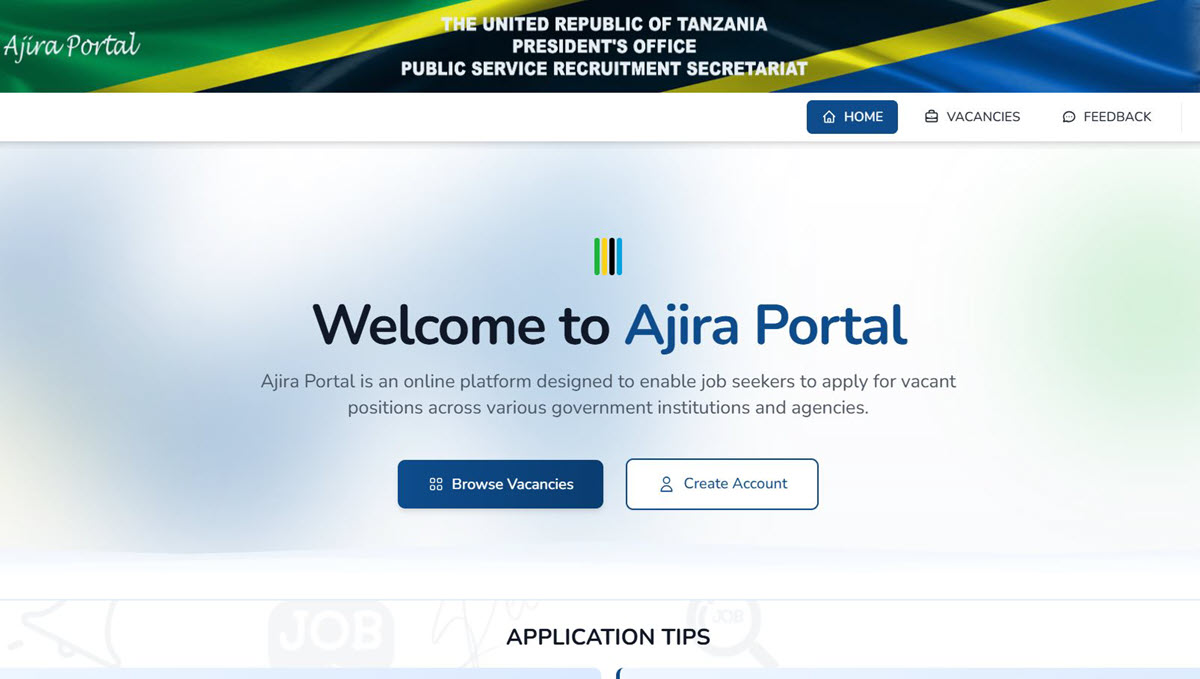
What Is Utumishi Ajira Portal?
The Utumishi Ajira Portal is the official recruitment platform of the President’s Office – Public Service Recruitment Secretariat (PO-PSRS). It serves as a centralized system where applicants can:
- Create personal accounts
- Upload required documents
- View and search advertised vacancies
- Apply for positions
- Monitor their application history
- Receive notifications for new opportunities
The platform supports transparency and equal access by publishing government job openings in one place and ensuring that recruitment processes follow a structured format.
How the Ajira Portal Works
The portal homepage provides essential features that guide applicants through the recruitment process. These include:
- Vacancies: A list of all advertised jobs, with filters for job category, description, opening date, and closing date.
- Application General Conditions: Requirements that applicants must comply with before submitting any application.
- Register / Log In: Access points for creating or entering an account.
- My Applications: A section that displays all applications submitted through the portal.
- Job Alerts: A notification feature for new vacancies, interview announcements, placements, and other updates.
Applicants begin by visiting portal.ajira.go.tz, where all interactions with the system take place.
How to Apply for Government Jobs Through Utumishi Ajira Portal
Step 1: Create an Account
To apply for government jobs through the Utumishi Ajira Portal, the first requirement is to register.
To begin the application process:
- Click the Register link on the homepage.
- Enter your email address and password.
- Confirm the password to ensure accuracy.
- Check your email inbox for an activation link.
Only activated accounts can be used. Applicants are advised to register with a secure and frequently used email address because this email will receive crucial updates during the recruitment process. The system emphasizes keeping the password “safe and secure” to protect your account
Step 2: Sign In to Your Account
After activation, sign in using the registered email address and password.
If the password is forgotten, the “Forgotten your password?” function allows users to request a temporary password. Once the temporary password is used to access the system, applicants are prompted to create a new one. Passwords stored in the system are encrypted, and a reset is the only recovery method.
Step 3: Access Your Dashboard
Once logged in, you will be taken to the Applicant Dashboard, where you can navigate through:
- Home
- Vacancies
- My Applications
- Register to Job Alerts
- Change Password
- Feedback
The dashboard also displays the profile completion percentage, which is important because applicants with complete profiles stand a better chance of being shortlisted. The system tracks this progress automatically as you fill out required sections
Step 4: Complete Your Applicant Profile
The applicant profile forms the basis of the digital CV within the portal. It contains the following sections:
- Personal Details
- Contact Details
- Academic Qualifications
- Professional Qualifications
- Language Proficiency
- Working Experience
- Training & Workshops Attended
- Computer Literacy
- Referees
- Other Attachments
- Declaration
During this stage, you will be required to upload supporting documents. All applicants are required to convert all their documents to PDF format, as it is the standard format supported in the portal. Academic certificates must be scanned individually before uploading. This ensures that each file is clear, valid, and properly attached to your application profile
Step 5: Search and Apply for Vacancies
To apply for government jobs through the portal:
- Go to the Vacancies section.
- Use the search bar or filters to find a job that matches your qualifications.
- Click More Details to view all information about the job, including duties, responsibilities, and salary scale.
- If the vacancy suits your qualifications, click Apply and follow the on-screen instructions.
Vacancies that have passed their deadline will be marked CLOSED, and applicants can only view them for up to seven days after closure. No applications can be submitted once the closing date has passed
Step 7: Track Your Applications
The My Applications tab displays a full history of your submissions. You can monitor the status of each application, filter records, and check for updates. This feature helps applicants stay organized and follow up on their recruitment progress systematically
Read Also: Best Places to Find Government Jobs in Tanzania